My AI Stack — Running Work Through a Terminal
My goal: run my entire work life through a terminal. I'm about 60% there. Here's what the setup looks like.
My goal: run my entire work life through a terminal. I’m about 60% there. Here’s what the setup looks like.
Six months ago this would have sounded paranoid or performative. Now it feels like the natural next step. As AI becomes the operating system for everything I do, it makes sense to consolidate around tools that talk to each other, that preserve context across sessions, and that let me stay in flow without switching between web apps and dashboards. A terminal is boring. It’s predictable. It works the same way on a laptop in a coffee shop as it does in a dedicated workspace. No distractions, no interface getting in the way.
I’m not there yet. But I’ve built enough of this stack to see the shape of where it’s going, and more importantly, to understand the tradeoffs of splitting work across multiple tools. There are three layers: Claude Code as the brain, Codex (by OpenAI) for building bigger tools and applications, and OpenClaw, a hosted agent on a spare computer that handles the riskier stuff. Each exists for a reason. Together they’re more complex than most people need. But I think that complexity teaches you something.
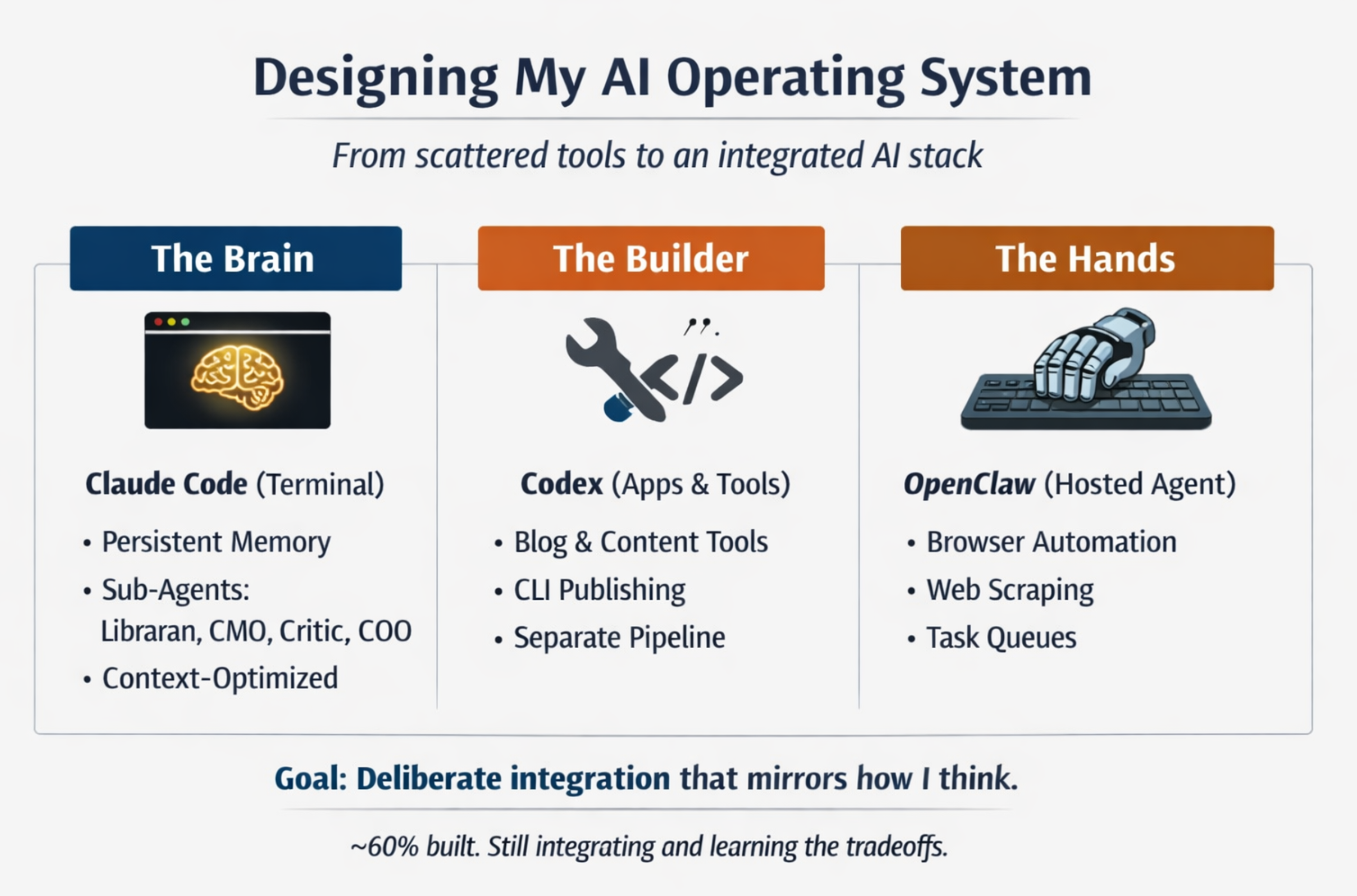
Claude Code is where 80% of my thinking happens. It’s Sonnet 4.6 running in the terminal with a custom system prompt and access to a persistent memory system I built. I’m not starting from scratch with every conversation. Claude knows who I am, what I’m building across four different workstreams, what’s happened in the last few weeks, and what decisions are pending. It knows the voice guidelines for writing, the frameworks I use for thinking, the people I’m connected to. That context makes it immensely faster to get real work done instead of re-explaining the landscape every session.
The other piece of Claude Code is sub-agents. I have a librarian for on-demand research — give it a topic and it searches the web, synthesizes what it finds, and files a summary back into the knowledge base. A researcher who tracks market trends and competitive signals. A CMO who owns brand strategy and content production. A critic who red-teams ideas. And a COO who manages tasks across workstreams and keeps priorities focused. Each agent has a narrower context than I do, access to a smaller set of tools, and clearer guardrails about what they’re supposed to do. In practice this means less token waste, more focused output, and fewer hallucinations because the agent isn’t trying to be everything at once. They’re also easier to update if I need to change how something works. I change the brand-strategist’s persona, and the next content pass is different. I don’t have to restate the whole thing in my prompt.
Is this better than just running everything through one Claude instance? Honestly, maybe not yet. The latest Claude versions are capable enough that you can do almost everything in one shot. But splitting into sub-agents forces you to think about what each tool is actually good at. You start to notice patterns. You see where you’re wasting tokens on context that doesn’t matter. You learn to build abstractions that actually reflect how you work. That learning curve is real, but I think it’s valuable. It’s the kind of understanding you don’t get from just pushing a question at Claude and waiting for the answer.
Codex is where bigger projects live. I built my blog in Codex. I’ve got a carousel generator for turning posts into multi-image content. I’m building tools to publish to LinkedIn and X directly from the command line. These aren’t one-off scripts. They’re real applications with actual architecture, tests, documentation. Keeping them in Codex, with their own codebase and deploy pipeline, keeps Claude Code clean and focused. When I’m thinking through a problem with Claude Code, I’m not bogged down in the mechanics of how to render an Astro page or chunk a video file.
There’s a secondary benefit: distribution of token usage. My Claude subscription has a usage limit. My Codex subscription (OpenAI, separate license) has its own limit. If I’m building an app that will do a lot of processing, it makes sense to run that through Codex so I’m not burning through my personal allocation on something that’s just a tool. And once the tool is built, it lives on its own and connects back to Claude Code via an API or a CLI call. I post a blog, and the publishing script calls the blog-publisher endpoint. Claude Code doesn’t have to know how it works. It just knows that blog publish will do the right thing.
OpenClaw is the hands. It’s a Claude instance running on a spare computer in my office with access to browser automation. I use it for things that are either risky from a security perspective or just faster to do with a browser. Scraping data from websites that don’t have APIs. Logging into accounts to do things like grocery shopping or booking travel. Summarizing videos when I want to learn something fast (the browser is genuinely the fastest way to give an agent access to the web). I also have it on my phone, which is nice for quick note-taking or capturing thoughts without context-switching to a different app.
The plan is to integrate OpenClaw more tightly with Claude Code via a shared GitHub repository. That’s the glue layer. It means Claude Code can queue something up for OpenClaw, and when it’s done, the results come back into the main system automatically. File transfer becomes easier. Context moves around without a lot of manual work.
Here’s the honest thing about this whole setup: it’s more complex than I need. The latest Claude models have gotten so capable that you can do basically everything in one environment now. All of this could theoretically run through Claude Code alone and still be faster and better than what I was doing six months ago.
Partly because I think multiple specialized tools will prove valuable as AI gets more sophisticated. Partly because I’m genuinely curious about how to design systems that work with AI rather than against it. But mostly because deliberately working with different tools teaches you what each one is good at. You pick up a feel for boundaries and tradeoffs. You learn to compose them together in ways that let you move faster. That understanding is hard to get any other way. You can read about it, but you don’t really know it until you’ve built something and felt it fail and fixed it and watched it work.
The goal isn’t to have the perfect stack. It’s to build one deliberately enough that it becomes an extension of how I think. Right now it’s 60% there. The rest is integration, testing, and learning what actually matters versus what I thought would matter but doesn’t. The terminal will still be just a terminal. But what runs through it will be something I understand deeply enough to adapt as AI keeps changing.